
Local
Install Dynamic Apps and run it locally while you build.
Every app runs as an isolated, durable instance. 22 MB of memory while serving, zero while idle. Deploy on any cloud.
Generated files
Deploy app
deployApp()
To do
Doing
Done
An agent generates the files. One call builds and releases them. Your Hono server routes every request to the app.
import { deployApp } from "@rivet-dev/agentos-apps";

// An agent, upload endpoint, or any other part of the system can call
// deployApp() with the files it generated.
await deployApp({
	appId: "hello-world",
	files: {
		"package.json": JSON.stringify({
			name: "hello-world-app",
			version: "0.0.0",
			private: true,
			type: "module",
			main: "src/index.ts",
			dependencies: {
				hono: "^4.12.9",
			},
		}),
		"src/index.ts": `
import { Hono } from "hono";

const app = new Hono();

// Serve the application's frontend.
app.get("/", (c) => c.html("<h1>Hello from agentOS Apps</h1>"));

// Serve a REST API request from the same application.
app.get("/api/hello", (c) => c.json({ message: "Hello from agentOS Apps" }));

export default app;
`,
	},
});
import { serve } from "@hono/node-server";
import { appsRouter } from "@rivet-dev/agentos-apps";
import { Hono } from "hono";
import { registry } from "./actors.js";
// Start the actor registry before routing applications.
registry.start();
const server = new Hono();
// Mount every deployed application at /apps/:appId.
server.route("/apps", appsRouter);
// Serve the host router over HTTP.
serve({
fetch: server.fetch,
port: 3000,
});import { setup } from "@rivet-dev/agentos";
import { setupApps } from "@rivet-dev/agentos-apps";
const { appsActors } = setupApps();
export const registry = setup({
use: {
// These actors manage app deployments and scaling.
...appsActors,
},
});import { actor, setup } from "rivetkit";
import { db } from "rivetkit/db";
const notes = actor({
db: db({
async onMigrate(database) {
await database.execute(`
CREATE TABLE IF NOT EXISTS notes (
id INTEGER PRIMARY KEY AUTOINCREMENT,
body TEXT NOT NULL
)
`);
},
}),
actions: {
async add(c, body: string) {
await c.db.execute("INSERT INTO notes (body) VALUES (?)", body);
},
async list(c) {
return c.db.execute("SELECT id, body FROM notes ORDER BY id");
},
},
});
export const registry = setup({
use: { notes },
});
registry.start();
export default function fetch() {
return Response.json({
app: "sqlite-notes",
message: "Use the RivetKit client to add and list notes.",
});
}Address each app by ID. Every user, tenant, or session gets a deployment of its own.
Each app runs in its own agentOS VM with its own state and SQLite data. Tenants share no filesystem, memory, or crash fate.
A running app takes 22 MB of memory. An idle one takes none.
The control plane routes the next request to a prewarmed agentOS VM, state intact.
Generated apps get the same capabilities as any Rivet Actor: durable SQLite, workflows, realtime, queues, and cron jobs.
Serve HTTP APIs and generated interfaces from the same app.
Read the docsStore durable relational data in an actor-owned SQLite database.
Read the docsRun durable jobs that sleep, retry, and resume, plus ordered queue processing.
Read the docsSchedule recurring work that runs even while the app is idle.
Read the docsShare realtime state between every user connected to an app.
Read the docsServe a directory with an index.html directly, no server code required.
Read the docsRequests reach your Hono server first, so your routing, middleware, and auth apply. The control plane routes each request to a prewarmed agentOS VM serving the app.
Your Hono server
agentOS VMprewarmed
serves the response
Read about routing, authentication, and deploying apps.
A failed build returns TypeScript diagnostics the agent uses to repair the files and deploy again. The active release keeps serving the whole time.
Read about deploying apps or view the AI App Builder example.
Deployed apps run as Rivet Actors, so the dashboard shows their data, jobs, events, and actions live.
Browse and query each app's SQLite data in realtime, across every deployment.
Inspect the progress, steps, and retries of jobs running inside an app.
Follow actions, connection events, and application logs while an app serves traffic.
Debug a live app by calling its actions and subscribing to its events from the dashboard.
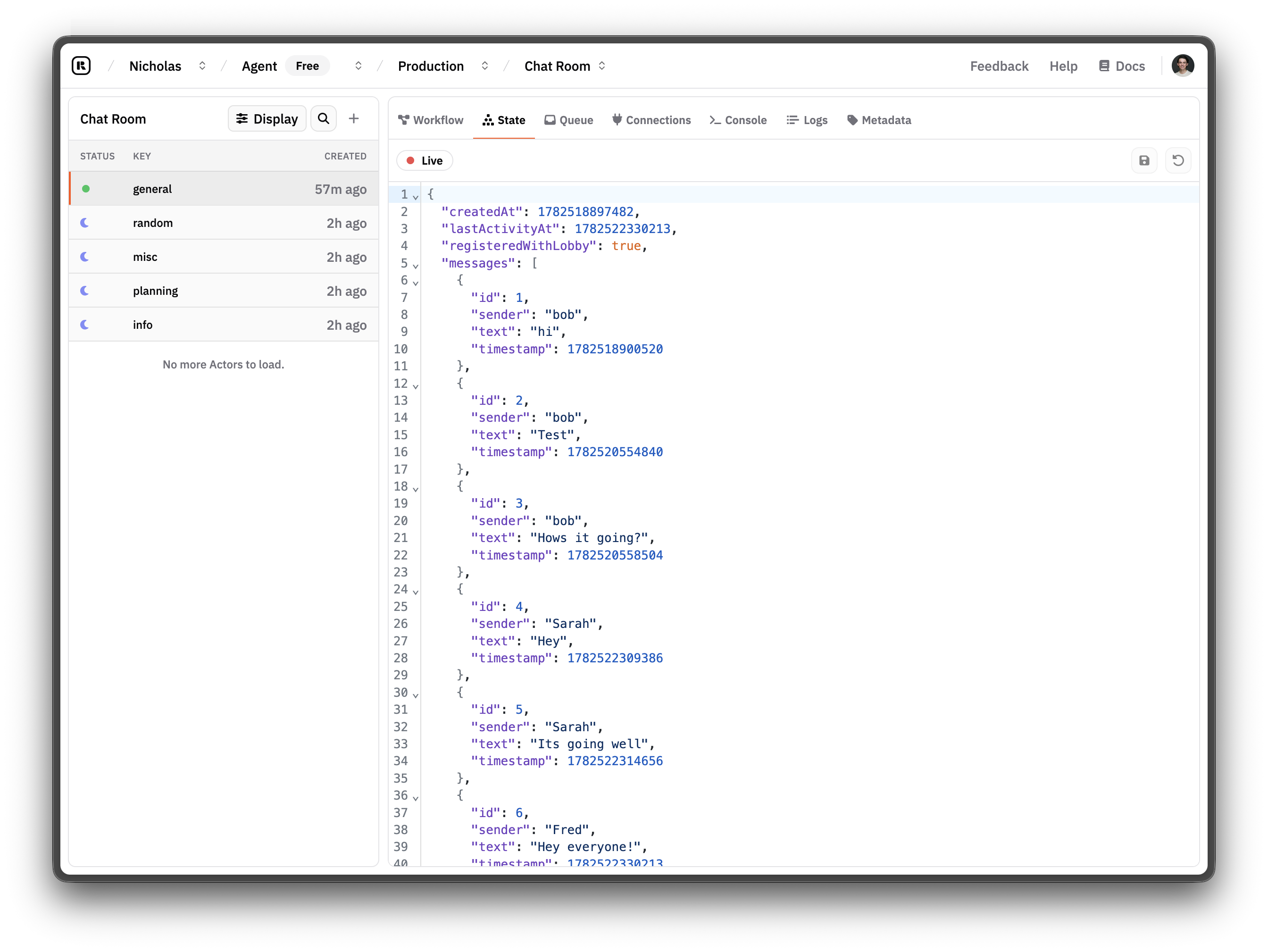
Every deployed app runs as Rivet Actors, which provide identity, durable state, queues, and scale to zero.
Product overviewBuilds and serves each app in a prewarmed VM with files, processes, and networking.
Product overviewAdds recorded steps, retries, and replay when a generated app runs multi-step work.
Product overviewDynamic Apps is a library, not a hosted platform. Run it anywhere and customize the server, routing, authentication, and deployment flow.
Install Dynamic Apps and run it locally while you build.
Deploy Dynamic Apps on Rivet Cloud with managed infrastructure and persisted Actor data.
Open the dashboardRun the open-source Rivet control plane as a Rust binary or container on your infrastructure.
Read self-hosting docsDeploy isolated, durable instances for the software your agents generate. They scale to zero and wake on demand.